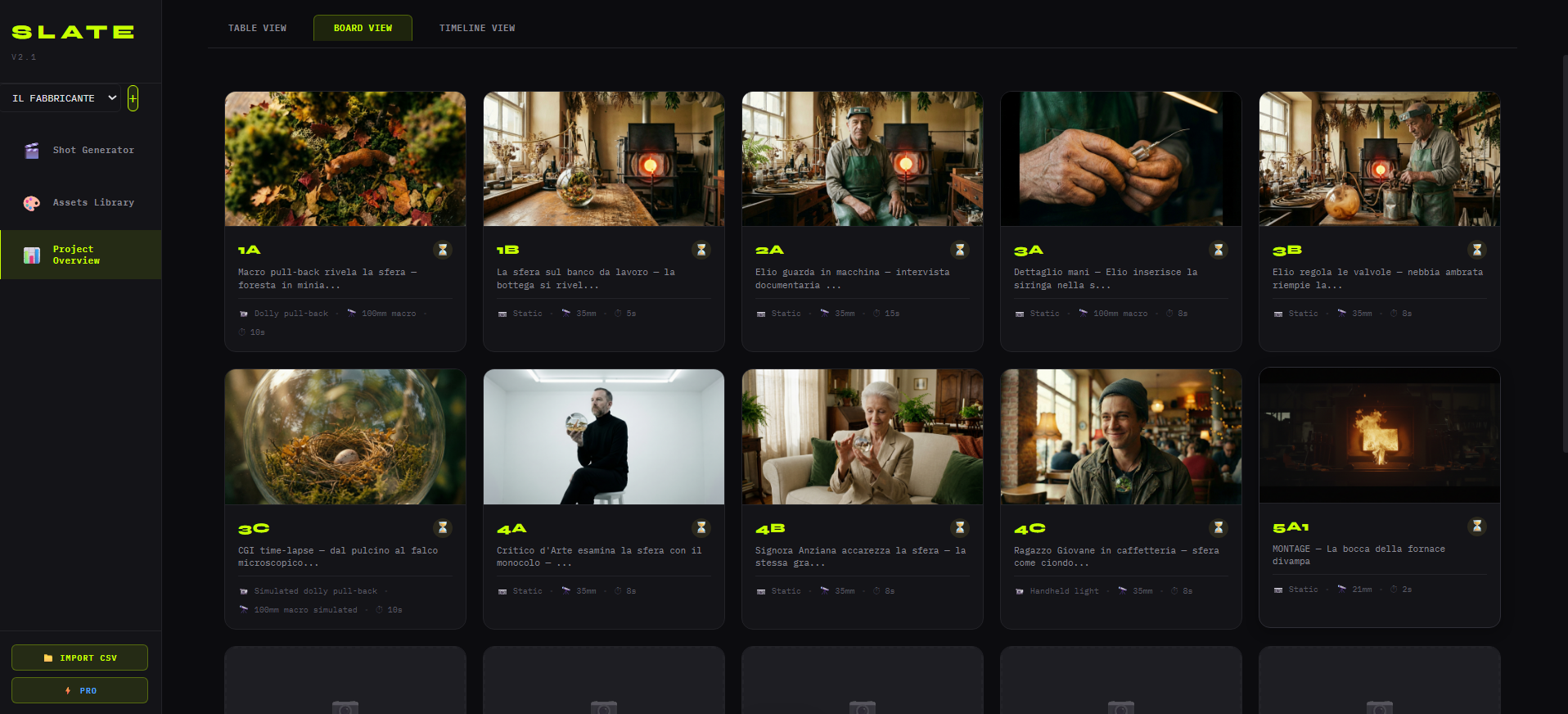
SLATE: MaiDreamsLab's AI video production system
Deep dive on the 5-phase SLATE system (Script, Layout, Assets, Timing, Export). Methodology + Python/SQLite desktop tool to bring set discipline to generative models.
Founder · AI Visual Specialist
SLATE is MaiDreamsLab’s proprietary AI video production system, organised in 5 phases � Script, Layout, Assets, Timing, Export � designed to bring set discipline to generative models. It’s both a methodology (the 5 phases documented in this article) and a standalone desktop Python + SQLite tool that codifies the phases into a technical workflow.
This article is the deep dive on how we use SLATE internally. For the executive summary go to the methodology page. For verified time savings go to the proof page.
Why a named system and not “we use AI”
SLATE was born from a concrete, repeatable problem: hundreds of scattered images, lost prompts, no visual continuity. It’s exactly what happens to anyone trying AI production without structure. Incredibly powerful models give you back thousands of beautiful, unusable assets � because they’re not tracked, not locked, not organised in a sequence.
SLATE solves three problems:
- Traceability � every shot has an ID, every prompt is saved and reconstructible
- Consistency � character/location/prop are locked reference images, applied automatically
- Continuity � the pre-assembly timeline shows rhythm before final generation
It was developed by Gianni Spezzano integrating 15 years of Italian cinematic pipeline (Gomorra, Pesci Piccoli/The Jackal, award-winning shorts) with 2024-2026 generative tools. The 5-phase structure isn’t theoretical: it’s the product of months of work on real projects (Il Fabbricante di Mondi, Vito Mellusso, Theter Spec Spot) that defined the workflow.
Phase 1 � Script: from screenplay to shot-by-shot breakdown
Goal: turn a traditional screenplay into a machine-readable technical breakdown. Core SLATE component: Script Converter. Output: shot-by-shot structure with technical metadata.
The Script Converter is the first SLATE component you meet. It imports a screenplay in standard format (Fountain, Final Draft, PDF) and converts it into:
- Scene list with narrative beats
- Shot-by-shot breakdown with metadata per shot: suggested lens, lighting mood, target duration, sequence tags
- Automatic per-shot brief that structurally pastes scene parameters into the generation prompt
The jump here vs the “write a prompt and see what comes out” workflow is huge: you move from improvised artisanal prompts to briefs that automatically inherit scene parameters (location, mood, character).
Phase 2 � Layout: shot-by-shot generation with context
Goal: generate the first visual of each shot, with full narrative-context awareness. Core component: AI generation integrated with shot ID and position. Output: first visual pass ready for review.
In Layout AI generation isn’t “fire a prompt and see”. Each shot is generated with awareness of:
- Its unique shot ID (e.g. SC03_SH07_dolly-in-protagonist)
- Its position in the sequence (what comes before, what comes after)
- The reference assets already locked in the Assets phase (even if Assets formally arrives later, in practice it’s already populated by previous scenes)
- The prompt template inherited from Script
The result is that even if you generate 100 shots in one session, each is already in the right place in the sequence, with tracked prompts and parameters. No more “AI_test_v3_final_REAL.zip” folders full of images whose prompt you can’t remember.
Phase 3 � Assets: the library that locks consistency
Goal: define once the visual protagonists of the project and apply them automatically. Core component: Assets library with reference linkage. Output: cross-shot and cross-episode consistency.
Assets is the phase that makes the real difference between “generative experiment” and “brand-safe production”. The workflow:
- Define once every recurring element: protagonist’s face, key location, symbolic prop, brand iconography. For each you pick one or more reference images.
- References get linked to the shots that need them.
- At every subsequent generation, references are automatically passed to the model (as image-to-video conditioning, IP-Adapter, LoRA � depending on the model).
On Vito Mellusso, our AI comedy series, this phase let us keep the character identical cross-episode without per-episode custom fine-tuning. On Il Fabbricante di Mondi it kept the fantasy elements of the narrative world consistent.
Phase 4 � Timing: visual pre-assembly
Goal: see the film before it exists, as a horizontal filmstrip. Core component: timeline view with 3 visualization modes (Technical, Visual Grid, Pre-Assembly). Output: visual cut approval before mass generation.
Timing is where direction gets corrected. After Layout you have a first visual for each shot (even just a still frame). In Timing you put them all in line in three views:
Visualization mode 01 � Technical Control
Full table with all shots, prompts, metadata. For those who want full technical control.
Visualization mode 02 � Visual Grid
Visual grid of all shots. Quick scanning, selection, cross-sequence comparison.
Visualization mode 03 � Pre-Assembly
Horizontal filmstrip showing shots in temporal sequence with their target duration. See the rhythm, the continuity, the narrative gaps before generating a single frame of final video.
This phase is where most corrections should happen. Changing a shot in Pre-Assembly costs zero (one still to re-generate). The same change in Export, after generating the final video, costs days of re-generation.
Phase 5 � Export: packages ready for the platforms
Goal: deliver organised, machine-readable ZIP packages to video generation. Core component: export engine with API integration or manual packages. Output: ZIP per shot ID + motion prompts ready, or direct API call.
Export is where SLATE interfaces with video platforms. Two modes:
Direct API integration
For tools with active APIs (today: Google Gemini integrated; others on roadmap), SLATE passes motion prompts + reference images directly to the platform, no middleman.
ZIP package export
For tools without active APIs (today: Veo, Kling, Luma, Runway via web interface), SLATE produces an organised ZIP:
- One folder per shot ID
- Reference images included
- Motion prompt written and ready to paste
- Technical metadata (target duration, mood, lens)
The operator takes the package, uploads it to the platform, processes it, and puts the final videos back in the shot’s folder. Linear, traceable, reconstructible.
The 2 formal approval gates
SLATE as a production methodology (not just a tool) provides 2 written gates:
| Gate | When | What the client signs |
|---|---|---|
| Gate #1 | End of Timing | The visual pre-assembly = the direction of the film |
| Gate #2 | End of Export + post | Final broadcast-ready master |
Revisions after a gate are billable extra. Those before the gate are included. This schema protects both client (knowing exactly when they can change) and studio.
SLATE’s technical architecture
For the curious:
Backend
Python standalone, SQLite local database, project isolation
Frontend
Local web interface (runs on desktop), 3 visualization modes, real-time preview
Integration
Personal API support (your keys), Google Gemini active, expandable architecture
Export
ZIP organised by shot ID, motion prompts included, platform-ready
Zero cloud
Everything runs locally � no third-party uploads, no proprietary lock-in
Zero cloud. Everything runs locally. No image uploads to third-party servers, no lock-in on proprietary platforms, full data control.
The three unwritten SLATE rules
Internal heuristics we’ve always used:
Rule #1
Never force a weak shot into the final cut. If after 3-5 generated variants it doesn’t work, back to Layout. A cut with a weak shot is a weak cut. Period.
Rule #2
Never burn compute before Gate #1. Mass video generation (the most expensive) starts only after the visual pre-assembly in Timing is approved.
Rule #3 � Non-negotiable
Human direction is non-negotiable. SLATE is a tool that amplifies the director. It doesn’t replace them. Every project has a signed director responsible for language, cut, sound choices.
SLATE as a consulting product
Beyond being MaiDreamsLab’s internal workflow, SLATE is available in consulting for production companies, agencies and enterprise teams. The consulting package includes:
- Tool onboarding on your team (1-2 days)
- Integration with your existing workflow
- Personal API setup (Gemini, more on roadmap)
- Training on screenplay ? Script Converter ? Layout ? Assets ? Timing ? Export
- Support for the first pilot project
If you’re interested in SLATE for your team, write here. To see it in action, read the case studies.
In summary
~60%
documented time saving on end-to-end production vs traditional pipeline
SLATE isn’t “the magic workflow”. It’s cinematic discipline translated into a tool. It’s rigorous in Script and Timing to be fast in Layout and Export. Formal gates protect client and studio. The pipeline eliminates the three classic pains of AI production: lost prompts, inconsistent assets, no continuity.
To apply it to your next project, let’s discuss in a 30-minute diagnostic call.
Last updated:
Got a brief?
Book a free 30-minute diagnostic call: we'll tell you if SLATE applies to your project.
Book a call